
Odoo 19: Every New Feature You Need to Know in 2026
Odoo 19 brings native AI agents, an ESG module, a redesigned POS and accounting upgrades. Discover what changes before you migrate.

Update, 25 September 2026: Odoo 20 was released at Odoo Experience 2026. This article covers Odoo 19, which is still supported. To go straight to the new version, see our Odoo 20 migration page.
Released in September 2025 at Odoo Experience, version 19 of the Belgian ERP is a turning point. For the first time, Odoo embeds artificial intelligence at the core of its applications, ships a dedicated sustainability module (ESG), and rethinks the user experience across the board. If you have just adopted Odoo or you are still ramping up, this guide explains what really changes, what disappears, and what it means for your daily work. No jargon, only concrete examples.
The key points in 30 seconds
- Release date: September 2025 (Odoo Experience 2025).
- New apps: Equity (share and shareholder management) and ESG (carbon footprint and sustainability reporting).
- Native AI: configurable AI agents, natural-language search, automatic field suggestions.
- Accounting, POS and e-commerce rebuilt: OCR-driven bank reconciliation, one-click payment, click & collect.
- Odoo 18 → 19 migration: 443 model changes and 51 field renamings; plan it carefully.
Table of contents
- Odoo 19 at a glance: why this release matters
- Native AI in Odoo 19: agents and assistants
- ESG: sustainability built into your ERP
- Accounting, HR and Equity: business modules redesigned
- POS, e-commerce and website: a sharper customer experience
- Inventory, manufacturing, purchasing: a smarter supply chain
- Migrating from Odoo 18 to Odoo 19: what to plan for
- FAQ
- Conclusion
Odoo 19 at a glance: why this release matters
Odoo is an enterprise resource planning (ERP) suite that brings accounting, CRM (customer relationship management), invoicing, inventory, HR and many other modules into a single database. Every year, the vendor ships a major release. Odoo 19 was unveiled in Brussels from September 18 to 20, 2025 at Odoo Experience.
This release stands out for three strategic directions:
- Artificial intelligence becomes native, not a cosmetic add-on.
- Sustainability enters the ERP through an ESG (Environment, Social, Governance) module.
- The user experience is rebuilt across all modules, from point of sale to accounting.
Odoo also launched 25 new vertical packages (accounting firms, law firms, real estate agencies, veterinary clinics and more) to speed up onboarding in specific industries. For the full official list, check the Odoo 19 release notes.
💡 Worth remembering: if you are still on Odoo 17 or older, version 19 condenses several years of UI and AI evolutions. The functional gap is huge, and so is the migration effort.
Native AI in Odoo 19: agents and assistants
This is the most talked-about new feature. Odoo 19 introduces configurable AI agents that can answer your questions and perform actions inside your database, create an opportunity, update a customer record, trigger a workflow.
How it works, concretely
Every agent relies on three building blocks:
| Block | Role | Example |
|---|---|---|
| System Prompt | Defines the agent's mission | "You are an Odoo sales assistant helping sellers qualify their leads." |
| Topics | Lists the scenarios the agent can handle | Lead creation, natural-language search, qualification. |
| Tools | Concrete actions the agent can run | create_lead, open_view, update_record. |
You can also pick a response style (analytical, balanced, creative) and feed the agent knowledge sources: internal PDFs, knowledge-base articles, links to your website, HR policies. These sources are indexed (RAG, Retrieval-Augmented Generation) so the agent can surface the right context when answering.
Natural-language search: "Ask AI"
No need to memorize filter names or model names. You type "Show me quotes above $5,000 pending for more than a week" and Odoo builds the query for you. For a beginner, this is probably the most immediate productivity gain.
The limits to know
Most AI features are restricted to the Enterprise edition. They consume AI credits (pay-as-you-go billing) and require careful configuration to avoid hallucinations. The official Odoo 19 AI agents documentation covers the technical details.
📌 Going further: if you want to drive Odoo from Claude, ChatGPT or any other external assistant through the Model Context Protocol, an open standard described by Anthropic and documented at modelcontextprotocol.io, explore the Aidoo platform, which acts as a secure bridge between your Odoo and the AI of your choice.

ESG: sustainability built into your ERP
ESG stands for Environment, Social, Governance, the extra-financial indicators a company tracks to measure its impact. In Europe, the CSRD (Corporate Sustainability Reporting Directive) now requires many companies to publish this type of reporting.
Odoo 19 ships, for the first time, a native ESG application, aligned with the international GHG Protocol, the reference framework for carbon accounting.
What the app can do
- Automatic emission calculation from supplier invoices and expense reports (purchases, travel, electricity).
- Preloaded emission factor database sourced from recognized references (notably IPCC).
- Scope 1, 2 and 3 categorization in line with the GHG Protocol.
- Social data: gender balance, pay gap, computed from HR and Payroll modules.
- Fleet data: fuel, consumption, via the Fleet module.
Why it matters for an SMB
Many SMBs delay their first sustainability initiative because they fear the cost and complexity. With Odoo 19 ESG, the data already lives in your ERP (invoices, payroll, vehicles): you just need to aggregate it correctly. See the official Odoo 19 ESG documentation for configuration details.
⚠️ Watch out: do not assume the ESG module replaces a carbon audit. It automates collection and reporting, but the strategic analysis still requires human expertise. For CSRD obligations, consult the European Commission CSRD page as well.
Accounting, HR and Equity: business modules redesigned
Accounting
Accounting receives several meaningful improvements:
- Improved OCR for bank reconciliation: Odoo reads your statements and proposes draft matches.
- WhatsApp reminders for overdue invoices (useful in both B2B and B2C).
- ISO 20022 support for international payments.
- New annual composite report combining the balance sheet and the profit and loss statement.
- Automated tax returns with built-in validation (scope depends on localization).
Human Resources
On the HR side, employee records and contracts are merged, which cuts down on double entry. Leave management is reworked, with better overtime tracking. A new gross-to-net salary engine simplifies payroll simulations.
Equity, the new application
The Equity application is brand new in Odoo 19. It tracks:
- company shares and stock,
- shareholders and beneficial owners,
- option and stock-option transactions,
- the valuation of the company over time.
For an SMB opening up its capital or rolling out an employee share plan, this native tool replaces the brittle spreadsheets that companies often end up maintaining.
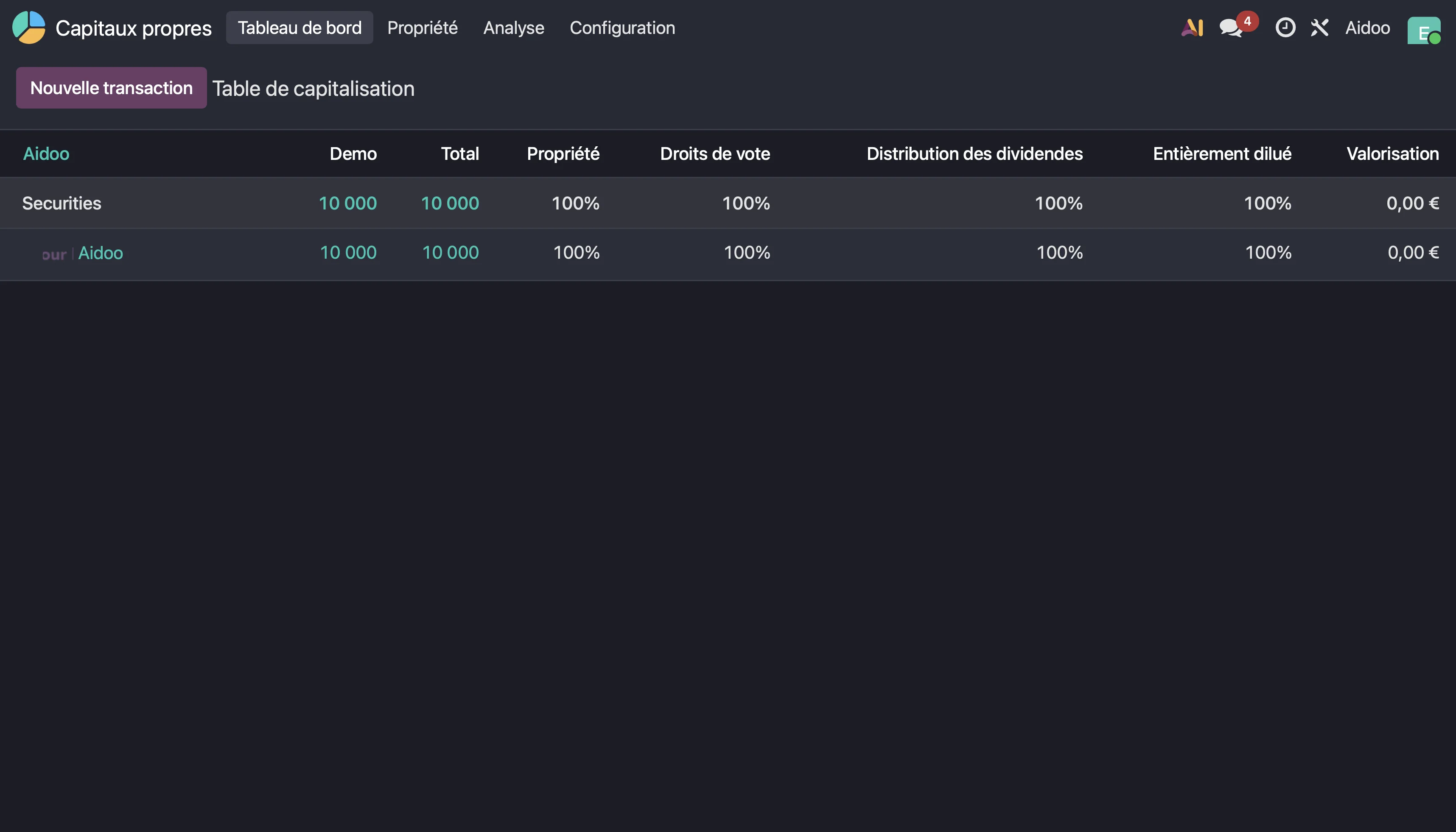
💡 Tip: before turning on the Equity module, export your current cap table (Excel, Google Sheets). You will be able to compare it after import to validate data integrity.
POS, e-commerce and website: a sharper customer experience
Point of Sale (POS)
The POS module gets a full visual redesign, with an available dark mode for cashier screens. Notable additions:
- Service presets: "dine-in", "takeout", "delivery", each with its own pricelists and fiscal rules.
- Course management for multi-course restaurant service.
- One-click payment: a win for high-volume retail.
- Direct refunds from supported payment terminals.
- Store opening hours enforced automatically.
- E-invoicing submitted directly from the POS session, a critical point in regions rolling out mandatory e-invoicing. To see where you stand in France, take our French e-invoicing compliance check.
E-commerce and website
On the e-commerce front, checkout is fully redesigned. You gain:
- a unit-of-measure selector (sell by weight, liter, unit),
- a Click & Collect widget with real-time per-location availability,
- variant previews on product pages,
- new dynamic snippets (e-commerce categories, payment methods),
- a Google Merchant Center integration that simplifies product feed setup.
The Website Builder offers more reusable templates and improved drag-and-drop, reducing the need for a developer to make simple tweaks.
📌 Contextual CTA: do you process hundreds of orders per month on your Odoo store? Connecting your ERP to an AI through Aidoo lets your assistant (Claude, ChatGPT…) answer customer questions or generate sales reports right inside the conversation.
Inventory, manufacturing, purchasing: a smarter supply chain
For industrial and trading companies, Odoo 19 strengthens several critical supply-chain steps.
Inventory
- Reworked Barcode app with cleaner screens on smartphones and handhelds.
- Batch transfers for pickers.
- Cycle counts that run during day-to-day operations without freezing stock.
- Smarter automated replenishment that factors in real lead times.
- Redesigned Forecasted report: Reserve / Unreserve buttons sit next to the related document.
Manufacturing (MRP)
- Custom quality checks at any production checkpoint.
- Customizable serial-number prefixes at the product level.
- Cost tracking based on actual or theoretical production time.
- Maximum batch size parameter to optimize operations.
Purchasing
- Richer accounting localizations.
- A new stock valuation approach more aligned with international accounting standards.
For an SMB juggling multiple warehouses, these changes cut data-entry mistakes and the time spent reconciling inventory gaps. According to a recent Gartner outlook on enterprise AI, AI-augmented supply-chain planning is one of the fastest-growing categories of enterprise software, which aligns with the direction Odoo is taking.
Migrating from Odoo 18 to Odoo 19: what to plan for
This is probably the most common question among teams that recently adopted Odoo 18. Migration is far from a one-click operation.
The numbers to know
An Odoo 18 → 19 migration typically involves:
- 443 model changes,
- 25 module merges,
- 51 field renamings,
- 130 model renamings,
- 416 constraint changes.
The recommended steps
- Full backup of database, filestore and custom code (filestore + SQL dump).
- Audit of custom modules: every Odoo 18 module must be recompiled and tested.
- Environment duplication: spin up a copy of production to dry-run the migration.
- Run the migration on the copy, validate with business users, fix gaps.
- Cut over to production during a low-activity window (weekend, evening).
- Heightened monitoring during the first few days.
Online vs On-Premise
| Edition | Recommended path |
|---|---|
| Odoo Online / hosted Enterprise | Official upgrade.odoo.com tool, supported by Odoo. |
| Enterprise on-premise | Official upgrade tool, then redeployment. |
| Community on-premise | No official self-service path: manual or third-party migration. |
See the official Odoo 19 upgrade guide for commands and options.
⚠️ Watch out: never migrate production without rehearsal. A migration tested three times on a copy is a calm migration.
Contextual CTA: if you would rather not migrate alone, reach out to the Aidoo team, we help SMBs and mid-market companies scope their Odoo project and connect AI to their ERP without risking production.
FAQ: your questions on Odoo 19
1. Is Odoo 19 free?
The Community edition remains free and open source. The Enterprise edition , which includes native AI, the ESG module, Equity and AI agents , is paid (subscription per user per month). Most of the headline features in version 19 are Enterprise-only.
2. Do I need to migrate to Odoo 19 right away?
Not necessarily. Odoo supports previous releases for three years (security, fixes). If your Odoo 17 or 18 runs fine, you can schedule the migration during a calmer window, after your peak season.
3. Will my custom modules work on Odoo 19?
Most likely not without changes. API changes and model renamings almost always require recompilation and fixes. Budget for a full code review with your integrator. To check a model's fields in the latest version, use our Odoo 20 model explorer.
4. Does Odoo 19's AI replace tools like Claude or ChatGPT?
No. Native Odoo AI acts inside the ERP. If you want to query Odoo from Claude, ChatGPT or any other external assistant , or orchestrate richer workflows , you need a bridge, for example through the Model Context Protocol. That is exactly what Aidoo provides.
5. How much does the Odoo 19 AI module cost?
The module is included with Enterprise, but AI consumption is billed on a usage basis (credits). The cost depends on interaction volume and the underlying model. Check current pricing on the official Odoo website.
6. Is the ESG module enough to comply with CSRD?
It provides automated collection and a GHG Protocol-aligned reporting framework, covering a significant portion of the scope. Full CSRD compliance still requires a materiality assessment and an external audit by a certified auditor.
Conclusion: Odoo 19, a structural release
Odoo 19 is not a cosmetic upgrade. The native AI integration, the ESG module, the POS and e-commerce overhaul, and the new Equity application make it a structural release for the years ahead. For a new Odoo user, it is also the right time to rediscover the ERP with a friendlier UI and automations that genuinely cut your cognitive load.
The trade-off: a more demanding migration than previous ones, which deserves a methodical plan. And one strategic decision to make, use Odoo's AI, plug an external assistant via MCP, or combine both depending on your use cases.
🚀 Have an Odoo project?
Are you adopting Odoo, planning a migration to version 19, or looking to leverage your ERP with an AI like Claude or ChatGPT?
Let's talk. The Aidoo team helps SMBs and mid-market companies scope their Odoo project and bring AI into their ERP.
Contact the Aidoo team → See our pricing → · Read other articles →
Sources
- Official Odoo 19 release notes, Odoo SA
- Odoo 19 documentation: AI agents, Odoo SA
- Odoo 19 documentation: ESG module, Odoo SA
- Odoo 19 upgrade guide, Odoo SA
- Model Context Protocol announcement, Anthropic
- Model Context Protocol specification, modelcontextprotocol.io
- Greenhouse Gas Protocol, World Resources Institute & WBCSD
- European Commission: Corporate Sustainability Reporting Directive (CSRD), European Commission
- Gartner , Information Technology , Gartner